Playbooks
Multi-country campaign links, a review checklist for each market
Run one campaign link across several countries. Plan each market's page, language, offer and fallback in a table, set the geo rules on one short link, and test it before launch.
Updated
A campaign that runs in several countries usually needs a different page per market: the local language, the local price and currency, an offer that's legal there, and a store that ships there. You can give each market its own link, or share one link everywhere and let it send each visitor to their country's page. The second is simpler when the same post, video or printed piece reaches all markets.
This playbook covers the one-link approach with geo targeting, and the checks to run for each market before launch.
Fill in the market table first
Agree on this table before anyone creates a link. Every row is one market:
| Market | Code | Destination | Language | Offer and end date | Owner |
|---|---|---|---|---|---|
| United States | US | https://example.com/sale | English | 20% off, ends 1 Dec 23:59 ET | Maria |
| United Kingdom | GB | https://example.co.uk/sale | English (UK) | 20% off, ends 1 Dec 23:59 GMT | Tom |
| Germany | DE | https://example.de/angebot | German | 15% off, ends 1 Dec 23:59 CET | Lena |
| France | FR | https://example.fr/promo | French | 15% off, ends 1 Dec 23:59 CET | Hugo |
| India | IN | https://example.in/sale | English | Free shipping, ends 2 Dec 23:59 IST | Arjun |
| Everyone else | https://example.com/sale/international | English | No discount, shipping info | Maria |
Copy it as CSV:
market,code,destination,language,offer,ends,owner,checked
United States,US,https://example.com/sale,English,20% off,2026-12-01 23:59 America/New_York,Maria,
United Kingdom,GB,https://example.co.uk/sale,English (UK),20% off,2026-12-01 23:59 Europe/London,Tom,
Germany,DE,https://example.de/angebot,German,15% off,2026-12-01 23:59 Europe/Berlin,Lena,
Everyone else,,https://example.com/sale/international,English,No discount,,Maria,
The last row matters most and is the one people forget. Visitors from any country without a rule go to the link's main destination, the Original URL. Make it a page that works for everyone: a sensible default language, no offer that's only valid somewhere else, and a way to reach the local site.
Review each market
Go through each row with its owner:
- Country code. Two-letter ISO codes. The United Kingdom is
GB, notUK. - The page loads in that country. Some stores redirect visitors by IP, so a page that works from your office may bounce a German visitor to another site.
- Language and currency. The page is in the right language, and prices are in the local currency.
- The offer is valid. Discounts, competitions and free shipping can have different legal rules per country. The page shouldn't promise something the market owner hasn't approved.
- End time in the local time zone. "Ends at midnight" is a different moment in each market. Write the time zone in the table.
- The domain is verified. Each country URL must be on a verified or whitelisted domain. If your markets use different domains, like
example.co.ukandexample.de, verify each one before creating the link.
Create the link
- Open Links and click Create Link.
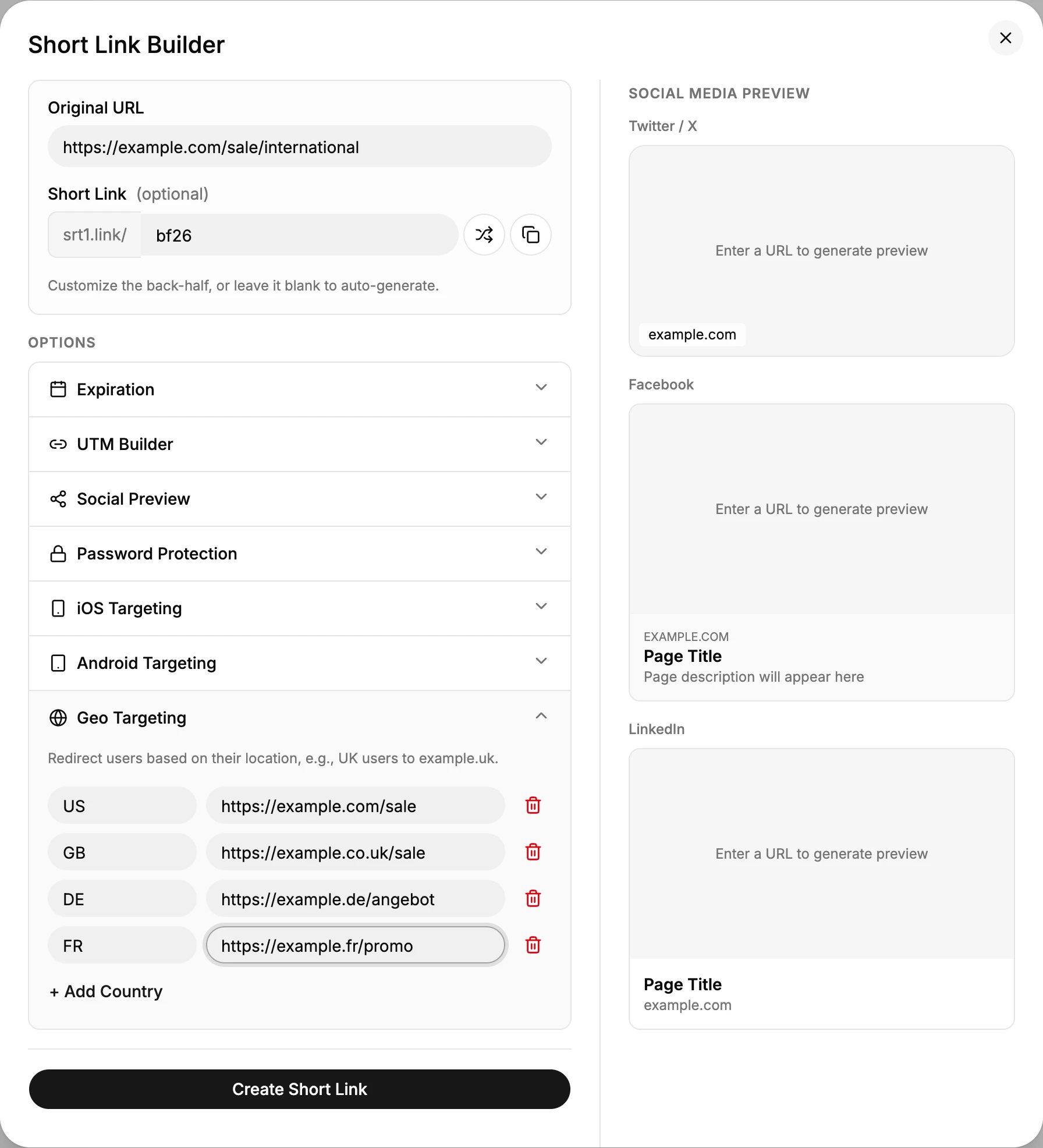
- Put the fallback page from the "Everyone else" row in Original URL.
- Give it a back-half that works in every language, such as
bf26. Avoid words that only make sense in one market. - Open Options, then Geo Targeting, and click + Add Country for each row. Enter the country code and its destination.
- Open UTM Builder and set the campaign values. They are added to whichever destination a visitor gets, so every market's analytics sees the same
utm_campaign. - Click Create Short Link.
Things that override the country
Shortener.dev picks the destination in this order:
- iPhone and iPad visitors go to the iOS URL, if the link has one.
- Android visitors go to the Android URL, if the link has one.
- Visitors from a country with a geo rule go to that country's URL.
- Everyone else goes to the Original URL.
App targeting wins over geo targeting. If the link sends iPhone users to your app, a German iPhone user goes to the app, not to the German page. For a multi-country web campaign, leave iOS and Android targeting empty, or point them to a deep link that handles the country inside your app.
The country comes from the visitor's IP address. People on a VPN, travelers and some mobile networks get the page for the country their connection appears to be in. Make sure every page links to the other markets.
Test before launch
You can't easily click from another country, so test in layers:
- Open the short link yourself and confirm you get your own country's page, or the fallback if your country has no rule.
- Ask someone in each market to open it, or use a VPN with an exit in that country, and confirm the page, language, price and offer.
- Test on an iPhone and an Android phone in at least one market, to confirm there's no app targeting you forgot about.
- Paste the link into WhatsApp or Slack to check the preview card. The preview is the same in every country, so it should make sense in all of them. Set it with Social Preview if the fallback page's title is market specific.
Fill in the checked column of the CSV for each market as it's confirmed.
Read the results by market
After launch, the Countries report in click analytics shows how many clicks came from each country. Compare it with the table:
- A market with many clicks but no rule is sending people to the fallback. Consider adding a page for it.
- Clicks from a country you didn't expect often mean the link was shared beyond the planned markets, or that people are on VPNs.
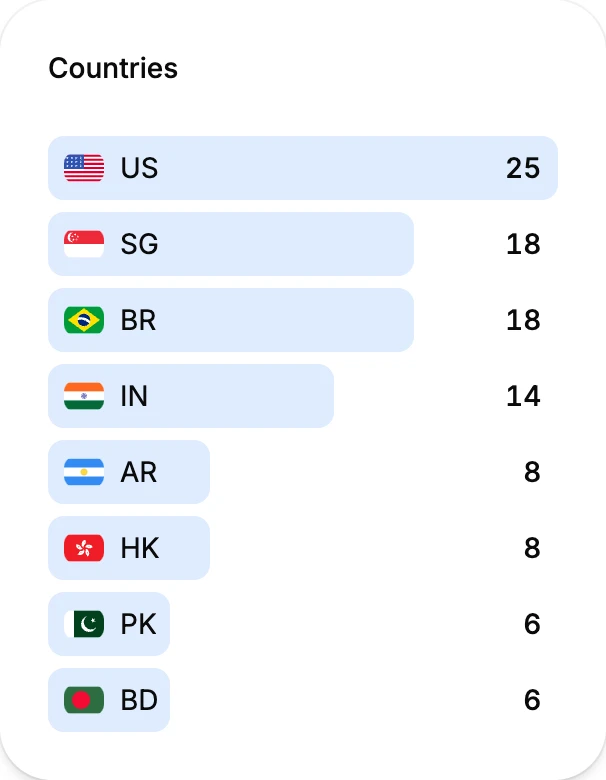
Click a country in the list to filter the whole Analytics page to it. Top Links, Referers and Devices then show only that market's clicks, and View clicks lists them one by one in Reports.
To compare sales or sign-ups per market, use each local site's analytics with the shared utm_campaign. The short link counts clicks, not orders.
After the campaign
When the offer ends, the link keeps sending people to pages that may now show an expired offer. Before the end date, decide one of these:
- Set an expiration date on the link for the latest end time across all markets.
- Edit the link and point the country URLs to evergreen pages.
- Turn the link off if it should stop working everywhere.
Frequently asked questions
How many countries can one link target?
Up to 195, one rule per country.
What happens to visitors from a country without a rule?
They go to the link's Original URL. Make that a page that works for any visitor.
Can I target a region or city instead of a country?
No. Geo targeting works by country. Click analytics shows the city of each click, but rules can only be set per country.
Do I need a separate QR code for each country?
No. A QR code made from the short link follows the same rules as the link, so one printed code sends each scan to its country's page.