Help
Why can't I shorten this URL?
What each error means when Shortener.dev won't create a short link, such as Domain not verified, Domain blocked or a back-half that's already used, and how to fix it.
Updated
Shortener.dev checks every destination before it creates a link, so most errors come from the URL itself rather than from your account. Find the message you see below.
Domain not verified
Domain not verified: example.com. Add and verify the domain ownership via email OTP or Google Search Console to create short links for it
Short links can only point to domains that are verified in your account or on the global whitelist of popular sites. This stops people from creating short links that pretend to be someone else's site.
In the dashboard, this opens a dialog that says the domain is not verified, with two buttons.
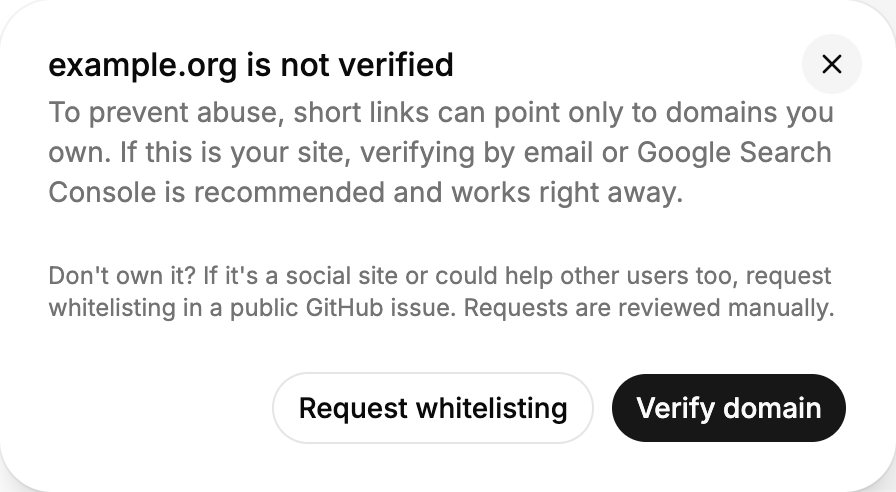
If it's your site, click Verify domain and confirm ownership with an email code or Google Search Console. It takes a couple of minutes, and your link is created as soon as the domain is verified. Verification covers every subdomain, so example.com also covers blog.example.com and shop.example.com. See Verify a domain.
If it isn't your site, it can't be shortened unless it's on the whitelist. If it's a social site or a service other people would link to as well, click Request whitelisting to open a public GitHub issue. Requests are reviewed by hand. You can see the domains that are already whitelisted under Domains in the dashboard, see Manage your domains and the whitelist.
Every URL in the link is checked, including the iOS and Android URLs and each geo targeting URL. The message names the domain that failed.
Domain blocked
Domain blocked: example.zip. Short links cannot be created for this domain
Some destinations are never allowed, even if you verify them:
- Other link shorteners, such as
bit.ly,tinyurl.comandt.ly. Shorten the final URL instead. - Free hosting, serverless preview and tunnel addresses, such as
*.vercel.app,*.netlify.app,*.workers.devandngrokURLs. Put the page on your own domain and verify that. - Top-level domains used heavily for phishing or that look like file names, such as
.zipand.mov, and adult content TLDs.
The full list is in the open-source code. If you think your domain is blocked by mistake, contact support@shortener.dev.
The URL is rejected as invalid or blocked
The destination must be a full http:// or https:// URL, at least 10 characters long. A URL without https://, such as example.com/page, is rejected. Links to .bat and .dat files aren't allowed either.
Invalid destination: ... IP addresses and local hosts are not allowed means the URL uses an IP address or a name like localhost instead of a domain.
This key has already been used
This key 'sale' has already been used, enter a new key(short url) or leave it blank to auto-generate
Back-halves are unique across all Shortener.dev accounts, so a short word may already belong to someone else, or to one of your own links. Pick a more specific one, such as sale-nov26, or leave it empty to get a random one. Deleting a link frees its back-half.
Must be 2-32 characters of letters, numbers, - or _
The back-half can only contain letters, numbers, - and _, and must be 2 to 32 characters. Spaces, dots, slashes and accented letters aren't allowed.
Expiration must be in the future
Must be greater then current date time + 5 minutes or empty means the expiration is in the past or less than 5 minutes away. Pick a later time or leave it empty.
Plan limit reached
The Free plan is limited to 50 links only, please upgrade
The Free plan includes 50 links in total. Paid plans count links created in the last month: 500 on Starter, 2,000 on Pro and 15,000 on Business. Existing links keep working when you hit the limit, you just can't create new ones. See Plans, limits and how long links last.
Too many requests
The API and the dashboard allow 150 requests a minute. When you create links in a loop, add a short delay between requests and retry after a few seconds when you get status 429.
Still stuck
Email support@shortener.dev with the URL you're trying to shorten and the exact error message.