Guides
Can you see who clicked your link? What click data shows
A short link can't tell you the name or email of the person who clicked. What the click log does show, how to estimate how many people clicked, and how to find out which recipient opened a link.
Updated
No link tool can show you the name, email address or social media account of the person who clicked. A click is a request from a browser, and browsers don't send who is using them. What you can see is where and how the click happened, and with the right setup, which recipient a link was sent to.
What Shortener.dev records for each click
Every click on a short link is listed in Reports, newest first:
| Field | Example | Where it comes from |
|---|---|---|
| Time | 17 Nov 2026, 14:32 | The moment the request arrived, stored in UTC |
| Short link | srt1.link/proposal-acme | The back-half that was opened |
| Country, region and city | United States, NY, New York | Looked up from the IP address |
| Browser and operating system | Chrome on macOS, Instagram on iOS | The browser's user agent |
| Device | Desktop, mobile or tablet | The browser's user agent |
| Referrer | linkedin.com, or Direct | The page the click came from, when the app sends it |
| IP address | 203.0.113.10 | The connection the request came from |
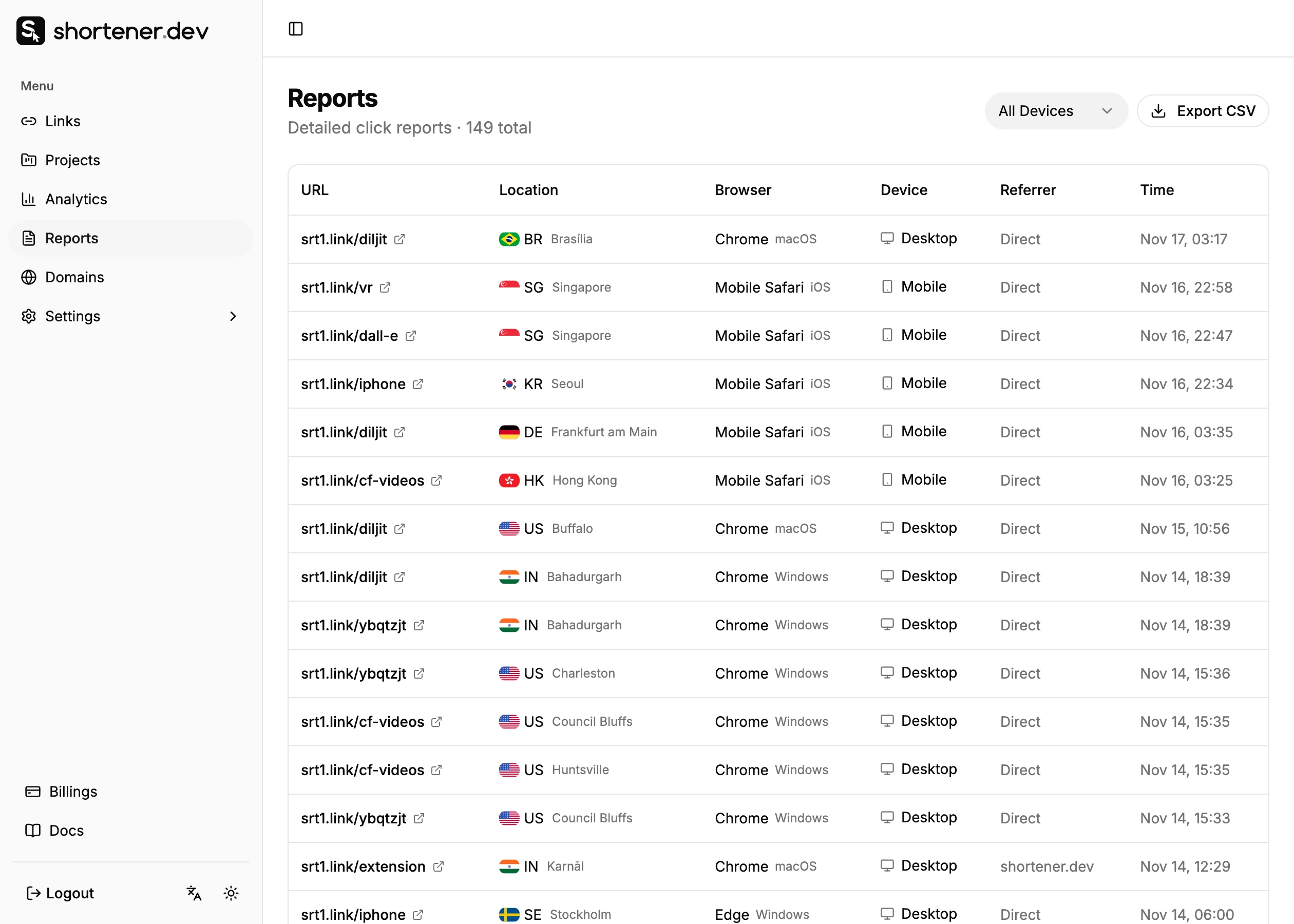
The click log is included on paid plans. Click analytics on every plan shows the same data as totals by country, referrer, browser, operating system and device.
What the data can't tell you
- Who the person is. No name, email, phone number or social profile.
- Exactly where they are. City is estimated from the IP address. Mobile networks, VPNs and company networks often place people in a different city, sometimes a different country.
- Whether two clicks are the same person. The same person on their phone and laptop looks like two visitors. Several people in one office or on one mobile network can share an IP address.
- What they did next. The click ends at the redirect. Use your website analytics to see what happened on the page. See Link clicks vs GA4 sessions.
Find out which recipient opened a link
If you need to know whether a specific person opened what you sent, give them a link of their own. Create a short link per recipient, all pointing to the same page:
| Sent to | Short link |
|---|---|
| Acme, proposal | srt1.link/proposal-acme |
| Globex, proposal | srt1.link/proposal-globex |
| Initech, proposal | srt1.link/proposal-initech |
A click on proposal-acme means someone opened the link you sent to Acme. It doesn't prove it was your contact, since they may have forwarded it, and an email security scanner may have opened it before them. Check the time and device in Reports before reading too much into a single click. See Bot clicks and link previews.
Use back-halves that don't give away anything sensitive. Anyone who gets the link can read the back-half. For documents that shouldn't be opened by others, add a password or an expiration date.
Estimate how many people clicked
Shortener.dev counts clicks, not people. To estimate people from a click log:
- Open Reports and click Export CSV to download the click log.
- In a spreadsheet, group the clicks by the
ipanddevicecolumns together. - Count the groups.
This undercounts people who share a network and overcounts people who clicked on two devices, so treat it as a rough figure. For most decisions, comparing clicks between links is more useful than estimating people.
Frequently asked questions
Can I see who clicked my link on WhatsApp or Instagram?
Not by name. You see the time, country, city, device and browser of each click. To know which group or message a click came from, use a separate short link for each one. See Track WhatsApp and SMS link clicks.
Can I see the IP address of people who click my link?
Yes, on paid plans. The IP address of each click is shown in Reports on wide screens and is included in the CSV export. Treat it as personal data: don't publish it, and keep it only as long as you need it.
Will the person know I'm tracking the click?
They see srt1.link in the link and, while being redirected, a page that names the destination. The redirect page doesn't set cookies or run analytics scripts. If you track links you send to people in the EU or UK, mention it in your privacy notice.
How long is click data kept?
Analytics history depends on your plan, from 7 days on Free to 90 days on Business. See Plans and limits.